🔗 Building SmokeMusicPlayer: A Real-Time Grid-Based Audio Visualizer
🔗 Introduction & Objective
SmokeMusicPlayer was conceived as an intersection between audio frequency analysis and computational fluid dynamics. The core objective of this project is to create an immersive, real-time 2D audio visualizer in Unity. Unlike standard bars or wave visualizers, SmokeMusicPlayer maps frequency data from incoming audio into physical forces that drive a fluid—in this case, smoke—creating an organic and mesmerizing representation of the music.
By translating the Fast Fourier Transform (FFT) spectrum directly into grid-based velocity and density modifications, we let the music physically push, swirl, and color the environment. The project is designed with modularity, real-time interactivity, and high performance in mind.
Figure 1: Real-time demonstration of SmokeMusicPlayer
🔗 Technical Architecture and Steps
The simulation is rooted in Jos Stam’s Stable Fluids method, adapted for execution on the GPU via Unity Compute Shaders. The architecture is primarily composed of two main subsystems: The Audio Analysis Layer and the Fluid Dynamics Renderer.
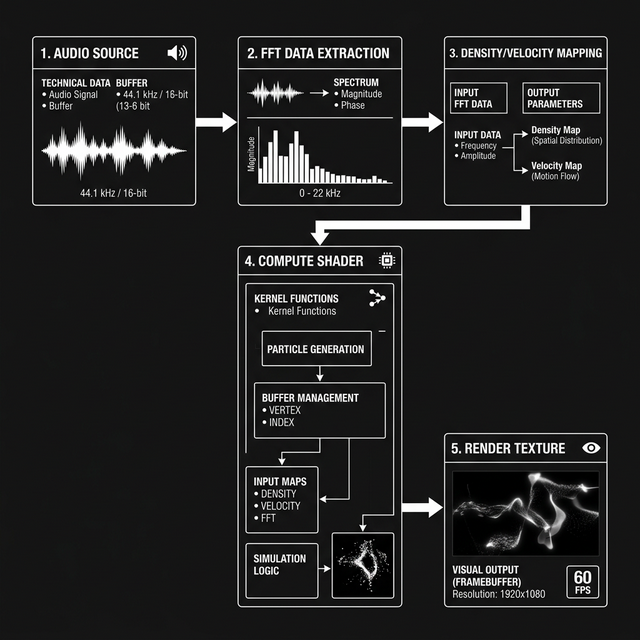
Figure 2: System Architecture – Audio to Visual Pipeline (Please provide illustration here)
- Audio Frequency Extraction (FFT): Using Unity's native audio API, we sample the spectrum data from the current clip using a discrete Fast Fourier Transform. The spectrum array is then grouped into bass, mid, and treble frequency bands.
- Data Mapping to Fluid Forces: The amplitude of these frequency bands is mathematically shaped to influence external forces on the grid. Kick drums inject sudden bursts of velocity (pushing the fluid upwards), while continuous high frequencies might continuously spawn bright-colored density at specific grid points.
- Grid Execution (Compute Shaders): The velocities and densities are mapped into a rendering texture. The Compute Shader runs the fluid dynamics simulation (Advection, Diffusion, and Projection) entirely on the GPU. By bypassing the CPU limit for grid iterations, the fluid feels smooth and highly responsive.
- Final Composition: The simulated texture is colored dynamically based on user presets and audio intensity, passing through post-processing effects before arriving on screen.
🔗 Implementation
Tricks & Optimizations
To maintain a stable 60+ FPS while simulating a complex grid, several clever optimization strategies and mathematical tricks were used:
- GPU Offloading via Compute Shaders: Simulating a large 2D grid requires solving the Navier-Stokes equations iteratively. Doing this on the CPU quickly creates a bottleneck. By splitting the mathematical operations (Advection, Jacobi iteration for pressure) into massively parallel compute threads, the simulation can scale dramatically.
- Audio Decay Smoothing: Raw FFT data fluctuates too quickly, causing flickering in the visualizer. To create a continuous flowing feeling, a decaying lerp (linear interpolation) function is applied to the amplitude. This allows the fluid emission to rise sharply on string hits (like a kick drum) but fade smoothly, mimicking the organic dispersion of ink.
- Backwards Semi-Lagrangian Advection: To prevent the simulation from exploding computationally, the advection step traces backwards in time rather than forwards. This guarantees unconditional stability regardless of the time step or velocity magnitude, ensuring a clean presentation.
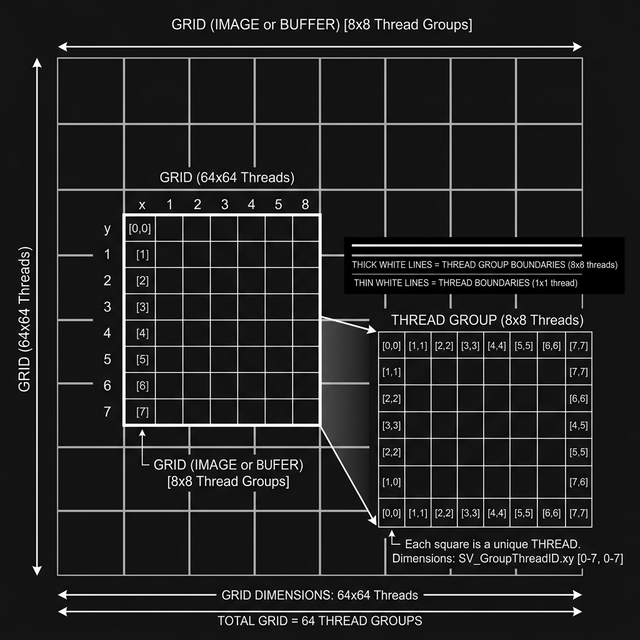
Figure 3: Representation of Thread Groups executing grid calculations concurrently (Please provide illustration here)
🔗 Analysis and Performance
The result is a highly immersive, interactive tool that responds flawlessly to audio. During profiling on mid-range hardware (Nvidia GTX 1060), deploying the fluid solver entirely in Compute Shaders reduced the frame time of grid iterations from ~16ms (CPU) down to ~1.5ms (GPU).
As a CPU-fallback measure, a simplified, lower-resolution solver is initialized on older environments without Compute Shader capabilities, sacrificing grid density for stability. A balancing slider to manipulate the "Stereo Balance" creates dynamic lateral drifts, taking full advantage of the fluid system's chaotic but beautiful diffusion.
🔗 Conclusion & Usage
The SmokeMusicPlayer is currently optimized for Windows Standalone builds. You can drag-and-drop any standard `.mp3` or `.wav` format, define your color palettes, tune the physical properties of the fluid (Viscosity and Diffusion), and save them to a custom preset.
Repository Link: SmokeMusicPlayer on GitHub

Bashar Beshoti
I'm a Computer Science student and an avid junior software developer with a passion for a variety of subjects, including computer graphics, computer vision, image processing, and software engineering. Additionally, I have a side hobby and minor interest in animation and sound creation.